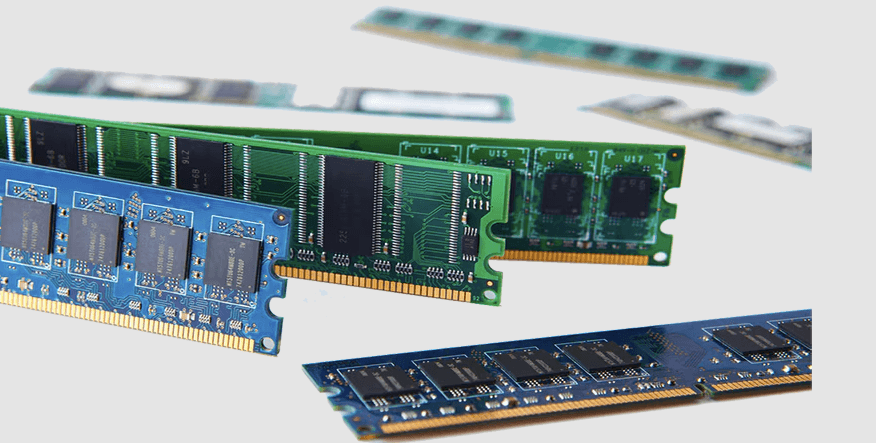
When your computer starts slowing down, one of the first things to look at is memory. The right computer memory solutions can make a big difference in how smoothly your system runs. From faster loading times to better multitasking, upgrading memory is a simple way to improve performance. With support from trusted providers like Ram Exchange, finding the right option becomes easier and more effective.
Why Computer Memory Matters
Computer memory, often called RAM, plays a key role in how your system handles tasks. It stores data that your computer is actively using, allowing programs to run smoothly.
Here is why memory is important:
- Faster Performance: More memory helps your system respond quickly
- Better Multitasking: You can run multiple apps without lag
- Improved Gaming and Design: High-memory systems handle heavy software with ease
- Smooth Everyday Use: Browsing, streaming, and working feel effortless
Without enough memory, even powerful systems can struggle.
Signs You Need a Memory Upgrade
Before choosing a solution, it helps to know if your system actually needs it. Many users ignore early signs of low memory.
Watch for these common issues:
- Slow startup times
- Frequent freezing or crashing
- Applications taking too long to open
- System lag when switching between tasks
- Browser slowing down with multiple tabs
If you notice these problems often, it may be time to explore better memory options.
Types of Computer Memory
Understanding different types of memory helps you make a smarter choice. Not all memory works the same way, and each type serves a specific purpose.
DRAM (Dynamic RAM)
- Common in most computers
- Used for general tasks
- Needs constant refreshing
SRAM (Static RAM)
- Faster than DRAM
- Used in cache memory
- More stable but limited in size
DDR Memory (DDR4, DDR5)
- Modern standard for most systems
- Faster speeds and better efficiency
- Ideal for both personal and professional use
Choosing the right type depends on your system compatibility and usage needs.
See also: Tech Updates Unveiling the Latest in Innovation
How to Choose the Right Memory
Selecting the right memory is not complicated when you know what to look for. Focus on key factors that directly impact performance.
Capacity
Memory size is one of the most important factors.
- 8GB works well for basic tasks
- 16GB is ideal for multitasking
- 32GB or more is best for heavy workloads
Speed
Faster memory improves system responsiveness.
- Higher MHz means better performance
- Important for gaming and creative tasks
Compatibility
Not all memory works with every system.
- Check your motherboard support
- Match the correct DDR version
- Ensure proper slot availability
Future Expansion
Think ahead when upgrading.
- Choose memory that allows easy upgrades
- Leave space for additional modules
Benefits of Upgrading Memory
Upgrading memory is one of the simplest ways to boost your system without replacing it entirely.
Here are the main benefits:
- Improved Speed: Faster processing of tasks
- Better Productivity: Work without interruptions
- Enhanced User Experience: Smooth and responsive system
- Longer System Life: Reduces strain on hardware
Midway through your upgrade journey, working with a reliable provider like Ram Exchange ensures you get memory that matches your system and usage perfectly.
Common Mistakes to Avoid
Many users make simple mistakes when choosing memory. Avoiding these can save time and improve results.
- Buying incompatible memory
- Ignoring speed differences
- Choosing low capacity for heavy tasks
- Mixing different memory types
- Not checking system limits
Taking a few minutes to research can prevent these issues.
Memory and Modern Computing Trends
Today’s digital world demands more from computers than ever before. From remote work to content creation, memory plays a central role.
Remote Work and Productivity
Modern work setups rely on multiple apps running at once. More memory ensures smooth performance during video calls, document editing, and multitasking.
Gaming and Streaming
Gamers and streamers need higher memory capacity for smooth gameplay and live streaming without lag.
Creative Software
Designers and editors use software that requires high memory. Upgrading ensures faster rendering and better workflow.
Cloud and Hybrid Systems
Even with cloud tools, local memory is important for smooth operation and quick access.
Tips for Maintaining Memory Performance
Once you upgrade, keeping your system optimized is just as important.
- Close unused applications
- Keep your system updated
- Avoid running too many background programs
- Use trusted software tools
- Restart your system regularly
These simple habits help maintain performance over time.
Making the Right Decision
Choosing memory is not just about buying the latest option. It is about understanding your needs and matching them with the right solution.
Ask yourself:
- What tasks do I perform daily
- Do I need better speed or more capacity
- Is my system compatible with newer memory types
- Will I upgrade again in the future
Answering these questions helps you make a smart and lasting choice.
Conclusion
Upgrading your computer memory is a practical step toward better performance and smoother daily use. With the right approach, you can improve speed, handle multiple tasks easily, and extend the life of your system. Choosing the right option does not have to be complicated when you focus on compatibility, capacity, and performance needs. If you are ready to enhance your system and enjoy a faster experience, now is the perfect time to take action. Get started now and Contact us Today to find the right memory solution for your needs.